Project 3.0
Scenic Snaps Nonprofit


Website Overview
Scenic Snaps is a non-profit site (by yours truly) with the primary intention of providing free nature photography for download, with the secondary goal of leveraging the free photos to encourage users to donate to sustainability organizations.
Notice: Due to funding and URL ownership complications scenicsnaps.com is no longer active.
Project 3.2
Download Journey (UX)
►
Project 3.2
Download Journey (UX)
▼


Project 3.2
Download Journey (UX)
Services Rendered
User Experience Design
User Story / User Journey
User Interface Design
Web Design


From the Beginning
Optimizing the download journey was a critical component of the site's architecture well before any wireframe was ever produced—ensuring the entire site is user-centric from the ground up.
Quick Selection
Step 01 of 06
Accounting for cognitive load, users are first encouraged to narrow their Snap search through category selection, rather than drowning in over one hundred immediate options.


Filtered Freedom
Step 02 of 06
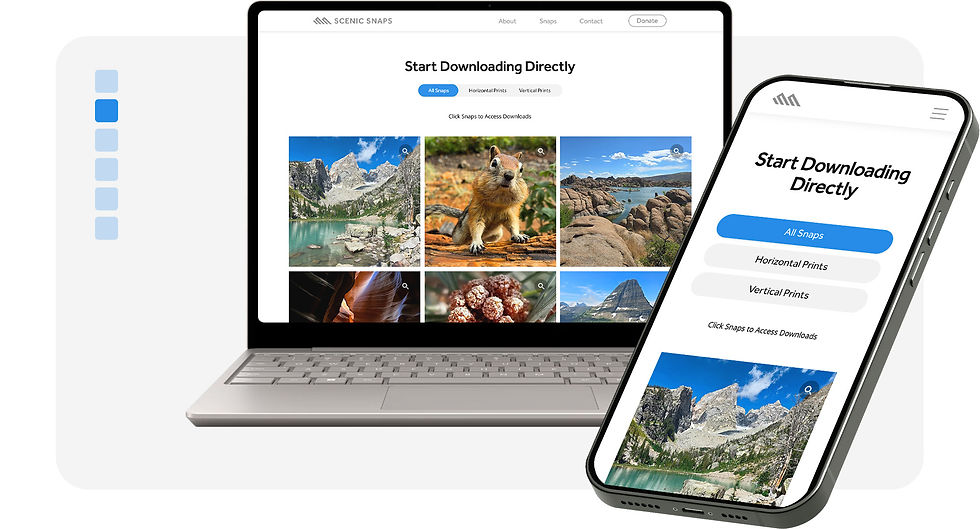
Users do have the freedom to scroll past the categories and view all Snaps but are offered the opportunity to reduce the cognitive load through horizontal and vertical orientation filters.

Locate Snap
Step 03 of 06
Filtered or not, once a desired Snap is located, users are informed to "click snaps to access downloads," to proceed in their download journey.


Narrow to Format
Step 04 of 06
Upon clicking their desired Snap, a drop-down menu opens containing a few options. The immediate focus is to confirm whether they are looking for digital or print files.


File Download
Step 05 of 06
After choosing their format, users may locate their desired file type and click the download button to retrieve it. As promised, their file is totally free. No purchase required.


Enjoy
Step 06 of 06
Once the Snap file is retrieved, users are free to integrate it into their preferred application—from print services to device backgrounds. Snap admiration encouraged.

